Installation Guide
Prerequisites
- Operating System: macOS, Linux, or Windows with WSL2
- Hardware: 16GB RAM minimum (32GB recommended), 50GB free disk space
- Software: Rancher Desktop installed with Kubernetes enabled
Step 1: Install Rancher Desktop
Rancher Desktop provides Kubernetes and Docker for your local environment.
- Download from rancherdesktop.io
- Install and launch
- Enable Kubernetes: open Preferences > Kubernetes and check Enable Kubernetes. Click Apply.
- Wait until the status bar at the bottom shows Kubernetes:1.34.4 (or similar version) — this means Kubernetes is ready.
- Allocate at least 8GB RAM and 4 CPU cores in Preferences > Virtual Machine
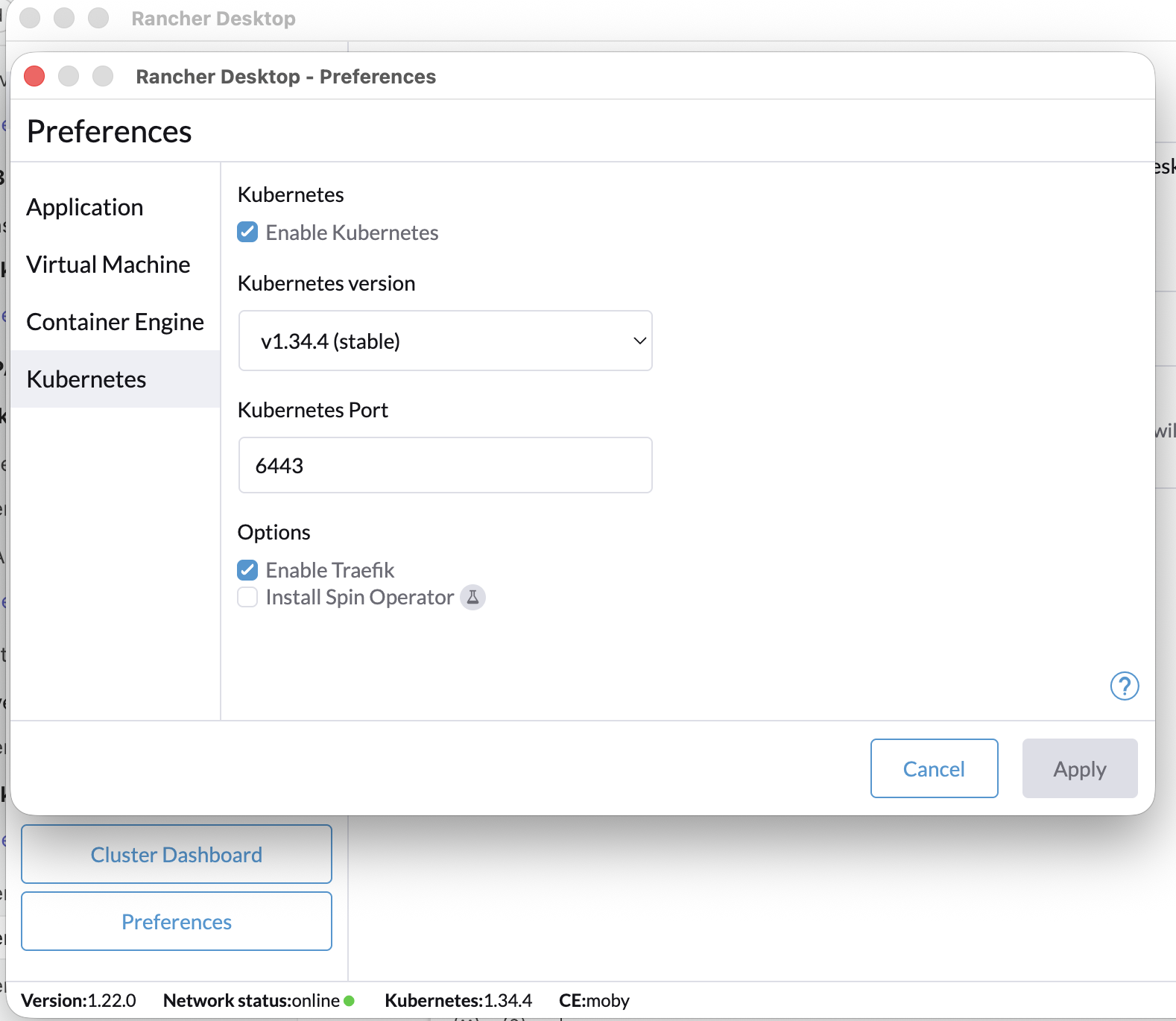
If you have Docker Desktop installed, uninstall it first as it conflicts with Rancher Desktop.
Verify it's ready:
kubectl get nodes
docker version
You should see one node in Ready state.
Step 2: Download the UIS CLI
The uis script is the only file you need. The container image with all tools is pulled automatically on first run.
macOS / Linux:
curl -fsSL https://raw.githubusercontent.com/helpers-no/urbalurba-infrastructure/main/uis -o uis
chmod +x uis
Windows (PowerShell):
Invoke-WebRequest -Uri "https://raw.githubusercontent.com/helpers-no/urbalurba-infrastructure/main/uis.ps1" -OutFile "uis.ps1"
Step 3: Start UIS
./uis start
On first run this will:
- Pull the
uis-provision-hostcontainer image from the registry - Create
.uis.extend/and.uis.secrets/configuration directories - Initialize default secrets and config files
- Start the provision host container
Verify Installation
# Check the container is running
./uis container

# List all available services
./uis list
All services should show "Not deployed".
What You Get
After installation, your directory contains:
my-project/
├── uis                   # UIS CLI (the only file you downloaded)
├── .uis.extend/          # Service configuration (yours to edit)
├── .uis.secrets/         # Passwords, API keys, certificates (gitignored)
└── .gitignore            # Auto-created, excludes .uis.secrets/
Everything else — Ansible playbooks, Helm charts, Kubernetes manifests, and CLI tools — lives inside the container image.
Updating UIS
To update the container image to the latest version:
./uis pull
This pulls the latest image and restarts the container.
If you need new CLI commands that were added after your initial install, update the wrapper script first by re-running the download from Step 2:
macOS / Linux:
curl -fsSL https://raw.githubusercontent.com/helpers-no/urbalurba-infrastructure/main/uis -o uis
chmod +x uis
Windows (PowerShell):
Invoke-WebRequest -Uri "https://raw.githubusercontent.com/helpers-no/urbalurba-infrastructure/main/uis.ps1" -OutFile "uis.ps1"
Then run ./uis pull to update the container.
Next Steps
- Getting Started — Deploy your first service
- Services Overview — See all available services
- Architecture — Understand how UIS works